Showing posts with label gmail. Show all posts

Saturday, May 7, 2011

Soon, AOL’s AIM Won’t Require A Separate Login To Chat With Contacts In Gmail

Since 2007, you’ve been able to sign in to your AOL Instant Messenger (AIM) account to chat with your AIM contacts directly from Gmail. You simply login with your AIM account in Gmail and your contacts will populate your gChat list, allowing you to chat with them just like you would your Google Talk contatcs.


From this notice, it looks like changes may be afoot to this feature. From AIM’s notice, In the next few days, Google and AOL are working together to change the way you connect to AIM buddies within Gmail. After this change, Gmail and AIM users can talk directly to each other without having to log into both services (you will no longer be able to log into AIM within Gmail’s “Chat” section).


It’s unclear what technology Google and AOL are working on that will allow users to integrate both services with Gmail; but AOL says it is working on an importer to add AIM contacts to your Gmail contacts list. AOL says in the notice: You’ll be able to IM them directly from your Gmail username, but your AIM Username will not show your online status.


AOL says the change will take place in the next few days, but you can sign up to receive a notice when new importer is available.


But honestly, who uses AIM anymore?


Disclosure: TechCrunch is owned by AOL.


View Original Article

Blogged with the Flock Browser

Tuesday, August 19, 2008

Tip: Set Gmail as your default email client in Firefox 3


For those of you using newly released Firefox 3, or willing to give it a try, you can take advantage of a new feature that lets you set Gmail as the default for all email links -- those that contain "mailto:" in them. If you're like me and don't have a default email client set up, then clicking these links typically launches an installation wizard for a destkop mail client, or opens some email software that you don't actually use.

Now you can configure Firefox to launch Gmail when you click on email address links and avoid the hassle. The folks over at Lifehacker published these tips on how to set it up:

1) Go to Gmail and sign in.

2) While in Gmail, copy and paste the following into your browser's address bar and hit enter.

javascript:window.navigator.registerProtocolHandler("mailto","https://
mail.google.com/mail/?extsrc=mailto&url=%s","Gmail")


Google Apps users can use this code (but be sure to replace yourdomain.com with your Google Apps domain name):

javascript:window.navigator.registerProtocolHandler("mailto","https://
mail.google.com/a/yourdomain.com/mail/?extsrc=mailto&url=%s","Gmail")


3) Click "Add Application" when you are prompted1. Congrats, you just added Gmail to your browser's list of mail clients.



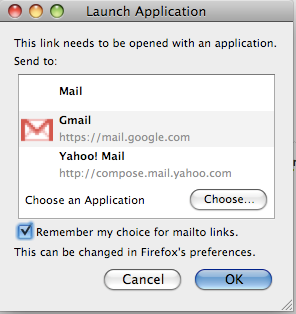
4) To set Gmail as your default, click on this link and you will be prompted with a dialog box listing available email applications. By selecting Gmail and checking "Remember my choice for mailto links" you won't have to tell your browser again. (You don't actually need to send an email after you click that link.)


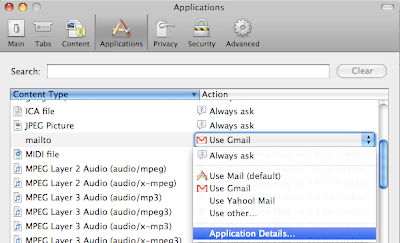
You can always change this setting by going into "Tools" > "Options" (or "Firefox" > "Preferences," for Mac users) selecting "Applications" and going to the "mailto" option. There's a drop down next to the option that lets you change your default. Clicking "Application details" will take you to a settings page where you can completely remove Gmail or other mail apps.


1If nothing happens when you type in the code, double check that you copied the entire snippet correctly, and if nothing happens, you probably changed an advanced setting (maybe without even knowing) and need to set it back to default. To do it, type about:config into your browser and make sure that network.protocol-handler.external.mailto is on the default setting: true.


View Original Article

Blogged with the Flock Browser

Chat with your Gmail contacts on the iPhone


Last week, we launched a new version of Google Talk designed specifically for the iPhone. It works right in your Safari browser, so there's no need to download or install anything -- just go to talk.google.com and sign in.*

Because this version of Talk is designed to run in your browser, you'll be automatically signed out of Talk when you navigate to a different browser window or iPhone app. So while it's not a traditional "always-on" instant message client, it's useful for changing your status message on the go or checking in to see if someone's online and sending them a quick chat. It's equally nice for killing time at the airport.

*Google Apps users: visit http://talkgadget.google.com/a/your-domain.com/talkgadget/m from your iPhone's browser, but be sure to replace 'your-domain.com' with your actual domain name.


View Original Article

Blogged with the Flock Browser

Monday, January 14, 2008

Switch Between Your Gmail Accounts

An useful feature of Gmail Manager, a great Firefox extension that notifies you when you receive new Gmail messages, is that you can easily log in to a different Gmail account without entering the username and password: after adding your Gmail accounts and Google Apps accounts, select the account by right-clicking on the Gmail Manager icon in the status bar and then click on the icon.


Another way to easily switch between your Gmail accounts is the Google Account Multi-Login Greasemonkey script, but it stores the passwords in a non-secure way.

Hopefully, Google will add a feature that lets you link a main Google account with your other accounts and log in once to access all your Google accounts, like you can do in Windows Live Hotmail:


If you want to minimize the number of times you access your secondary Gmail accounts, forward all the messages to your main account and enable it to send messages using custom From: addresses.


Blogged with Flock

Sunday, January 13, 2008

Import Your Hotmail Messages into Gmail

I finally found an use for Microsoft's Windows Live Mail, a mail client that replaces Outlook Express as the light version of Outlook. Windows Live Mail has a unique characteristic: it's free and it allows you to access Hotmail accounts. Microsoft also provides a plug-in for Outlook with an exuberant description:

"With Microsoft Office Outlook Connector, you can use Microsoft Office Outlook 2003 or Microsoft Office Outlook 2007 to access and manage your Microsoft Windows Live Hotmail or Microsoft Office Live Mail accounts, including e-mail messages and contacts for free!"

Microsoft probably thinks it makes you a favor by providing ways to access your mail from a desktop client, so it uses a proprietary mechanism that can only be interpreted by Microsoft's software.

But I digress: Windows Live Mail is a good way to migrate the messages from your old Hotmail accounts to Gmail.

1. Enable IMAP for Gmail.

2. Download Windows Live Mail. Microsoft no longer links to the standalone version of the product and it forces you to install a package, but you can choose the software you want to install.

3. Add the Hotmail accounts from Windows Live Mail's interface.

4. Add your Gmail account and make sure you manually configure the IMAP settings.

5. To prevent some new Gmail labels from being created, right-click on your Gmail account from Windows Live Mail's sidebar, select Properties, go to the IMAP tab and uncheck "Store special folders on IMAP server".

6. Then go to the inbox of each Hotmail account, select all the messages (Ctrl+A), right-click, choose "Move to folder..." (or "Copy to folder..." if you want to keep them in Hotmail) and select the Inbox of your Gmail account (or create a new folder). You should repeat this for each folder created in Hotmail.


If you don't expect to receive other message in your Hotmail accounts, uninstall Windows Live Mail. Otherwise, check your Hotmail accounts from time to time and manually move the messages to Gmail. Microsoft doesn't allow you to create rules for IMAP and HTTP mail accounts, so you can't forward new messages to Gmail. If you try to use the forwarding option from Hotmail, you'll notice that Microsoft still tries to keep your mail hostage.


Blogged with Flock